Conditional cell styling
Conditional cell styling lets you apply a Style to individual cells based on a predicate function. This is useful for highlighting out-of-range values, flagging errors, or color-coding categories.
When to use it
Use conditional cell styling when you want specific cells to look different based on their value or the row's data — for example, making negative prices appear in red, or highlighting expired dates.
Basic example
Define a TableViewConditionalCellStyle with a Predicate and a Style. Add it to the ConditionalCellStyles collection on the TableView or on an individual column.
<tv:TableView ItemsSource="{x:Bind Products}">
    <tv:TableView.ConditionalCellStyles>
        <tv:TableViewConditionalCellStyle Predicate="{x:Bind IsLowPrice}">
            <Style TargetType="tv:TableViewCell">
                <Setter Property="Background" Value="#00d26a" />
                <Setter Property="Foreground" Value="#f4f4f4" />
            </Style>
        </tv:TableViewConditionalCellStyle>
    </tv:TableView.ConditionalCellStyles>
</tv:TableView>
The Predicate property takes a Predicate<TableViewConditionalCellStyleContext>, which provides the column and data item for evaluation.
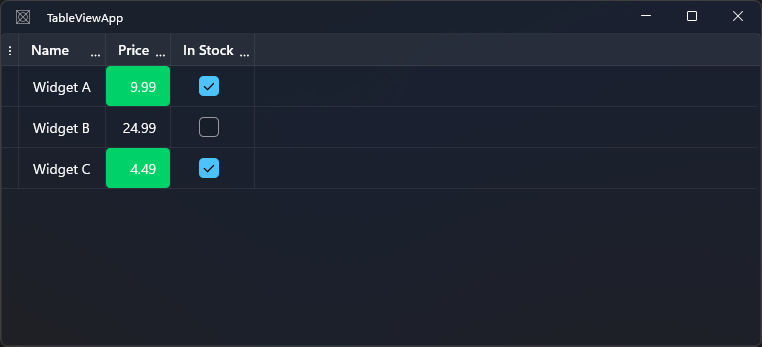
Defining predicates in code
The easiest way to supply predicates is from the code-behind or ViewModel. With x:Bind, you can bind to a method directly:
// Code behind or ViewModel
public Predicate<TableViewConditionalCellStyleContext> IsLowPrice => static context =>
{
    // Apply only to the Price column
    if (context.Column.Header?.ToString() != "Price")
    return false;

    return context.DataItem is Product p && p.Price < 10;
};
Per-column conditional styles
You can also add ConditionalCellStyles on a specific column instead of the whole table. This keeps the predicate logic scoped to the column:
<tv:TableViewNumberColumn Header="Price" Binding="{Binding Price}">
    <tv:TableViewNumberColumn.ConditionalCellStyles>
        <tv:TableViewConditionalCellStyle Predicate="{x:Bind IsPriceNegative}">
            <Style TargetType="tv:TableViewCell">
                <Setter Property="Foreground" Value="Red" />
                <Setter Property="FontWeight" Value="Bold" />
            </Style>
        </tv:TableViewConditionalCellStyle>
    </tv:TableViewNumberColumn.ConditionalCellStyles>
</tv:TableViewNumberColumn>
public bool IsPriceNegative(TableViewConditionalCellStyleContext ctx) =>
    ctx.DataItem is Product p && p.Price < 0;
TableViewConditionalCellStyleContext
The predicate receives a TableViewConditionalCellStyleContext value with these members:
| Property | Type | Description |
|---|---|---|
Column |
TableViewColumn |
The column of the cell being evaluated |
DataItem |
object? |
The data item for the row |
Multiple conditional styles
You can add multiple TableViewConditionalCellStyle entries.
Styles are evaluated in order. If multiple predicates return true, the
first matching style wins.
Column-level conditional styles are evaluated before TableView-level conditional styles, so column styles have higher priority.
<tv:TableView.ConditionalCellStyles>
    <tv:TableViewConditionalCellStylesCollection>
        <!-- Evaluated first (higher priority) -->
        <tv:TableViewConditionalCellStyle Predicate="{x:Bind IsExpiringSoon}">
            <Style TargetType="tv:TableViewCell">
                <Setter Property="Background" Value="#FFF9C4" />
            </Style>
        </tv:TableViewConditionalCellStyle>
        <!-- Evaluated second if the first predicate does not match -->
        <tv:TableViewConditionalCellStyle Predicate="{x:Bind IsExpired}">
            <Style TargetType="tv:TableViewCell">
                <Setter Property="Background" Value="#FFCDD2" />
            </Style>
        </tv:TableViewConditionalCellStyle>
    </tv:TableViewConditionalCellStylesCollection>
</tv:TableView.ConditionalCellStyles>
Setting ConditionalCellStyles in code
tableView.ConditionalCellStyles = new TableViewConditionalCellStylesCollection
{
    new TableViewConditionalCellStyle
    {
        Predicate = ctx => ctx.DataItem is Product p && p.Stock < 10,
        Style = lowStockStyle
    }
};
Notes and limitations
- Conditional styles are evaluated each time a cell is rendered or refreshed. Avoid expensive operations inside predicates on large datasets.
- Conditional styles apply to the
TableViewCellcontainer, not the inner display element (e.g.TextBlock). To style the inner element, useElementStyleon the column. - Table-level and column-level
ConditionalCellStylesboth apply. Column-level styles take precedence over table-level styles when both match.